This document contains technical guidelines on how to use Cloud4Wi development tools, including APIs, Webhooks, Mobile SDKs and MyApps
WiFi SDK
Cloud4Wi WiFi SDK is a convenient Software Development Kit that helps you easily add seamless and secure WiFi connectivity to mobile apps and unlocks location services regardless of OS location permissions
Cloud4Wi Location SDK (referred to as "GeoUniq") helps you easily add location tracking to your app, overcoming native OS location tracking performances and capabilities.
Platform APIs
Platforms APIs allow managing Cloud4Wi resources programmatically, including places, contacts, moments and logs.
Webhooks
Webhooks allow integrating real-time events with your own data stack to unlock real-time and context-aware applications such as:
trigger communications in real-time in your Marketing automation tool
synch Contacts in real-time with your CRMS as soon as a person sign up
feed Contact Profiles in real-time to clienteling interfaces when a person arrives in a location
Demo toolkit
Use Cloud4Wi demo apps for iOS and Android to test Cloud4Wi geofencing before integrating the SDK, or to test your implementation of Cloud4Wi side-by-side with a complete implementation
MyApps
Create and publish custom context-aware content during the WiFi onboarding or on the dashboard
The method GeoUniq.sharedInstance().getDeviceId() return the id relative to the device if it has been registered, nil otherwise.
Reset device Id
The method GeoUniq.sharedInstance().resetDeviceId() reset the Device Id by invoking a new device registration.
Reset device Id
The method GeoUniq.getInstance(context).resetDeviceId() reset the Device Id by invoking a new device registration.
Flutter
getInterlinkedC4WIMobileSDKApplications
Get the of applications interlinked with the current one
/**
 * Get list of application identifier current interlinked with
 */
- (NSArray<NSString *> *) getInterlinkedC4WIMobileSDKApplications;
logout
Close customer session
/**
 * Close customer session (it removes the customerId saved during the create customer)
 * Removes any reference to the customer
 */
- (void) logout;
The session is opened when one of this functionscreateCustomer,setupCustomer and getCustomerInfo return success.
It deletes passpoint internet profiles installed in the device using createPasspointProfile and createWPA2EnterpriseProfile.
The delete of the wpa2-ent profile is not supported on iOs for technical limitation, the only way to delete it is to remove the application or to forgot the wifi network.
this limitation no longer exists since SDK v 1.6.0
setAPIAuthParams
Set SDK authentication parameters
/**
 * Set the SDK authentication parameters
 *
 * @param _clientKey - API client key
 * @param _clientSecret - API client secret
 * @param error -  set to non-nil if failed
 */
- (void) setAPIAuthParams: (NSString*) _clientKey
             clientSecret: (NSString*) _clientSecret
                    error: (NSError**) error;
initC4w
Initialize the SDK
This method is assumed to be called every time the app starts
/**
 * This method is assumed to be called every time the app starts.
 * This method, among other things, will (if the customer is already registered/logged-in the app)
 *  - update the `lastseen` of the customer
 *  - update the push token of the customer
 *  @param pushToken - push token passed from mobile app
 */

- (void) initC4w: (NSString*) pushToken;
updateCustomerInfo
Update a Customer metadata
/**
 * Update a Customer metadata
 *
 * @param onSuccess - invoked if customer info update was processed without exceptions
 * @param onError - invoked if an exception occurred
 *
 */
- (void) updateCustomerInfo: (void (^)(void)) onSuccess
                    onError: (void (^)(NSError *error)) onError;
getListOfPolicies
Get the list of configured policies
/**
 * Get the list of policies configured in the Cloud4Wi account
 *
 * @param onSuccess - invoked if policies list was successfully obtained
 * @param onError - invoked if exception occurred
 *
 */
- (void) getListOfPolicies: (void (^)(NSArray<Policy *> *policies)) onSuccess
                   onError: (void (^)(NSError *error)) onError;
deleteWPA2EnterpriseProfile
It deletes the WPA2 enterprise profile installed by the app.
This method is assumed to be called every time the app starts
    /**
     * This method assumed to be called every time the app is started.
     * This method will (if the customer is already registered/logged in the app)
     *  - update the `lastseen` of the customer
     *  - update the push token of the customer (Firebase token)
     *  - update the guId (GeoUniq device id) of the customer
     */
    @TargetApi(Build.VERSION_CODES.JELLY_BEAN_MR2)
    public void initC4w();
deleteWPA2EnterpriseProfile
It deletes the WPA2 profile installed by the app.
let cloud4wi = Cloud4WiSDKWiFi.init()cloud4wi.deleteWPA2EnterpriseProfile()
This method triggers the installation of a WPA2-Enterprise Wi-Fi profile in the device or update an existing one for the same network. The OS will trigger a dialog to ask the user the consent to allow such operations. See
getCustomerInfo
Retrieve a Customer by username/password
Calling this function It is equivalent to a make a login with the username/password passed. The success of this function opens a session with the customer returned. To close the session use logout() method.
CustomerDocument
Variable
Description
Example
updateCustomer
Update the customer's attributes
The attributes:
username, password, lock
CustomerQuery
Variable
Description
Example
setupCustomer
Create an empty Customer with default policies
To use this function when you are integration just the Location SDK
Calling this function It is equivalent to a make a login. The success of this function opens a session with the customer returned. To close the session use logout() method.
getCreatedPasspointProfile
Returns list of created Passpoint profiles
Home location
Get Home Location
Allows to get the home location calculated for this device.
Return an HomeLocation object if home location is available or null otherwise.
logout
Close customer session
The session is opened when one of this functionscreateCustomer,setupCustomer and getCustomerInfo return success.
getCustomerId
Returns the identified of the customer created/logged with Cloud4wi Wifi SDK
setInterlinkedC4WIMobileSDKApplications
Configure the list of apps to be linked to current app
SDK Methods
getCreatedWPA2EnterpriseProfiles
Returns list of created WPA2EnterpriseProfiles
getCreatedWPA2EnterpriseProfiles
Returns list of created WPA2EnterpriseProfiles
Examples
How to get the list of WPA2-Enterprise profiles installed by the app, get the first one and print its ssid value.
Objects
checkIfCustomerExists
Search a Customer by customer properties
This method allows checking if a Customer with certain attributes (e.g. email or phone number) already exists in the Cloud4Wi account.
Android
setAPIAuthParams
Set SDK authentication parameters
You can get your API client key and secret following .
setupCustomer
Create an empty Customer with default policies
To use this function when you are integration just the Location SDK
Calling this function It is equivalent to a make a login. The success of this function opens a session with the customer returned. To close the session use logout() method.
getInterlinkedC4WIMobileSDKApplications
List of application identifiers current interlinked with
Installation
Installation
CocoaPods
Add pod 'c4w-location-sdk'
checkIfCustomerExists
Search a Customer by customer properties
This method allows checking if a Customer with certain attributes (e.g. email or phone number) already exists in the Cloud4Wi account.
WPA2EnterpriseProfile
setInterlinkedC4WIMobileSDKApplications
Configure the list of apps to be linked to current app
The function updates the customer created with functions createCustomer,setupCustomer and getCustomerInfo.
/**
     * Update existing customer.
     *
     * @param customer - Customer with all fields that needs to be updated.
     *                 All customer fields except 'lock', 'username' and 'password' can be updated with this method.
     *
     * @param onSuccess - invoked if customer successfully updated
     * @param onError - invoked if exception occurred
     *
     * @return future with Boolean which represents if customer was successfully updated
     */
    @TargetApi(Build.VERSION_CODES.JELLY_BEAN_MR2)
    public Future<Boolean> updateCustomer(Customer customer, Callback<Boolean> onSuccess, Callback<MobileSDKException> onError) {
        return asyncExecutor.execute(() -> apiService.updateCustomer(customer), onSuccess, onError);
    }
a string value associated to the customer. Usually it is used to store an external CRM id of the customer
/**
 * Create empty customer with default policies.
 *
 * @param onSuccess - invoked if customer was created sucessfully
 * @param onError - invoked if exception occurred
 *
 */
- (void) setupCustomer: (void (^)(CustomerCreateResponse *resp)) onSuccess
               onError: (void (^)(NSError *error)) onError;
/**
     * Returns list of created Passpoint profiles
     *
     * @return List of PasspointConfiguration objects
     * @throws Exception
     */
    public List<PasspointConfiguration> getCreatedPasspointProfiles() throws Exception {
        return wiFiProfileService.getCreatedPasspointProfiles();
    }
It deletes passpoint internet profiles and wpa2-enterprise installed in the device using
createPasspointProfile
.
    /**
     * Close customer session (it removes the customerId saved during the create customer)
     * Removes any reference to the customer
     */
    @TargetApi(Build.VERSION_CODES.JELLY_BEAN_MR2)
    public void logout();
- (NSString *) getCustomerId;
/**
 * Configure list of application to be interlinked with current
 *
 * @param identifiers - list of applications identifiers
 */
- (void) setInterlinkedC4WIMobileSDKApplications: (NSArray<NSString *> *) identifiers;
    /**
     * Returns list of created WPA2EnterpriseProfiles
     * For Android versions 4.3 - 9  returns comprehensive list of configured WiFi profiles
     * For Android versions 10+ returns list of WiFi Suggestions installed by MobileSDK
     *
     * @return List of WPA2EnterpriseProfile objects which could be either of type:
     * `WPA2EnterpriseProfileWifiConfiguration` for Android versions 4.3 - 9
     * `WPA2EnterpriseProfileWifiNetworkSuggestion` for Android versions 10+
     * @throws Exception
     */
    public List<WPA2EnterpriseProfile> getCreatedWPA2EnterpriseProfiles() throws Exception;
  /**
     * Create empty customer with default policies.
     *
     * @param onSuccess - invoked if customer was created successfully
     * @param onError - invoked if exception occurred
     *
     */
    @TargetApi(Build.VERSION_CODES.JELLY_BEAN_MR2)
    public Future<CustomerCreateResponse> setupCustomer(Callback<CustomerCreateResponse> onSuccess, Callback<MobileSDKException> onError)
/**
     * List of interlinked applications with C4WIMobileSDK incorporated
     *
     * @return List of interlinked applications which incorporate C4WIMobileSDK
     * to get installed WiFi network suggestions
     */
    @TargetApi(Build.VERSION_CODES.Q)
    public List<String> getInterlinkedC4WIMobileSDKApplications();
    /**
     * Check if customer with provided via CustomerQuery properties already exists
     *
     * @param query - <CustomerQuery> object with at least one field initialized
     * @param onSuccess - invoked if `customer exists` call was proceeded without exceptions
     * @param onError - invoked if exception occurred
     * @return future with boolean result of `customer exists` result
     */
    public Future<Boolean> checkIfCustomerExists(CustomerQuery query, Callback<Boolean> onSuccess, Callback<MobileSDKException> onError);
String ssid;
    /**
     * For Android versions 10+ add interlinked applications
     * which incorporate C4WIMobileSDK to get installed WiFi network suggestions
     *
     * @param authorities in a form of List<String>
     */
    @TargetApi(Build.VERSION_CODES.Q)
    public void setInterlinkedC4WIMobileSDKApplications(List<String> authorities);
updateCustomerInfo
Update a Customer metadata
    /**
     * Update API with customer metadata
     *
     * @param onSuccess - invoked if customer info update was proceeded without exceptions
     * @param onError - invoked if exception occurred
     * @return future with CustomerMetadata result
     *
     */
    @TargetApi(Build.VERSION_CODES.JELLY_BEAN_MR2)
    public Future<CustomerMetadata> updateCustomerInfo(Callback<CustomerMetadata> onSuccess, Callback<MobileSDKException> onError);
getCustomerId
Return the customerId saved during the create customer
    /**
     * Returns Customer ID
     * @return String `customerId` of the user registered in the app
     * @nullable if no Customer logged in or not registered yet
     */
    @TargetApi(Build.VERSION_CODES.JELLY_BEAN_MR2)
    public String getCustomerId();
isPasspointSupported
Check if Passpoint feature is supported on current device.
    /**
     * Check if Passpoint feature is supported on current device.
     *
     */
    public boolean isPasspointSupported() {
        return wiFiProfileService.isPasspointSupported();
    }
Username and password are the WiFi credentials of a Cloud4wi customer. When you create a customer using the method createCustomer the credentials are returned in onSuccessin the object.
Examples
Additional features
Debug Mode
The debug mode allows you to have useful information on the console for debugging the application and the SDK. When enabled - SDK will print configuration parameter on startup and additional information on every API request that may help you during application development.
To enable the debug mode you have to configure this key into plist file of the app.
In DEBUG MODE sensitive informations (like customer attributes, credentials, keys ...) are written to the debug console.
To disable the DEBUG MODE before deploy/publish the application.
Push notification token
If you need to get the remote push notification token and associate it to a customer you have to init the SDK with the token using the method cloud4WiSDKWiFi.initC4w(token).
Example
Interlinking multiple applications on one device.
Cloud4WiSDKWiFi allows you to share information about installed Wi-Fi profiles among applications on same iOS device. This will help to avoid duplications of Wi-Fi profiles and make your application more flexible.
NOTE: this feature is optional, you may need it only if you integrate SDK in more than one application from your domain.
To enable interlinking you have to add App Group capability in every application where SDK is integrated. Group name must be set to group.com.cloud4wi.sdk.wifi:
After adding required capability you have to supply SDK with the list of interlinked applications identifiers:
getListOfPolicies
Get the list of configured policies over API
This method allows retrieving the list of consents (referred as "policies" in this context) configured in the Cloud4Wi account, including the default one and the custom-defined ones.
The first 3 consents returned by the method are always the ones referring to:
terms of use ("termsOfUse")
privacy policy ("privacy")
marketing ("marketing")
As a reminder, to create a Customer is always mandatory to set the privacy policy and the terms of use to true.
createPasspointProfile
Add or update Passpoint Wi-Fi profile
This method triggers the installation of a Passpoint Wi-Fi profile in the device.
/**
     * Add or update HotSpot 2.0 Wi-Fi profile
     *
     * @param username - authorization user name
     * @param password - authorization password
     *
     * @throws Exception - exception thrown if profile cannot be created or updated
     */
    @TargetApi(Build.VERSION_CODES.O)
    public Future<Boolean> createPasspointProfile(String username, String password,
                                                  Callback<Boolean> onSuccess,
                                                  Callback<MobileSDKException> onError) {
        return asyncExecutor.execute(() -> wiFiProfileService.createPasspointProfile(username, password), onSuccess, onError);
    }
Passpoint is supported in Android 11+.
We suggest to fallback to WPA2 enterprise if the device doens't support Passpoint using the following snippet.
Passpoint home realm which will be recognized by device as home Passpoint network.
wifi.cloud4wi.com
friendlyName
Enable/Disable
The SDK can be enabled and disabled at runtime. To make GeoUniq SDK start, you need to enable it by calling the method GeoUniq.enable() at least once.
You might do that into the main activity of your app, as in the example below.
Once enabled, the SDK will not stop until you disable it by calling GeoUniq.disable(). That is, it will keep performing automatic operations, such as tracking the device position, even after a device reboot or an update of the app. Disabling the SDK at runtime is useful if you want the SDK to stop completely. For example, you could remotely control a configuration parameter of your app to stop the SDK for all or some of your installations.
If you simply don't want GeoUniq to keep collecting location data for a specific User, you can do that without completely disabling the SDK (see Handle user consent). This way you can still exploit the mobile-side functionalities that the SDK provides without having GeoUniq collecting data for the specific user
Project initialization
Initialize Users
In order to track geofencing events, you need to initialize a user in your Cloud4Wi account.
The method to initialize users is exposed in the WiFi SDK, so you need to integrate also the WiFi SDK into your project.
Once both the WiFi and Location SDKs are installed you can use the following snippet to initialize the customer in Cloud4Wi as soon the deviceId is assigned to the phone. This function will initialize an anonymous user without any additional attribute or personal data associated.
In the alternative, you can use the native WiFi SDK methods to .
Allows to get the work location calculated for this device.
Return a WorkLocation object if work location is available or null otherwise.
GeoUniq.getInstance(context).getWorkLocation()
Register Work Location listener
Sets the listener class that will receive updates when the work location changes.
The listener must be impIement the IWorkLocationListener interface.
Unregister Work Location listener
Remove work location updates for the listener.
PasspointProfile
Variable
Description
Example
createWPA2EnterpriseProfile
Add or update WPA2-Enterprise Wi-Fi profile
This method triggers the installation of a WPA2-Enterprise Wi-Fi profile in the device. The OS will trigger a dialog to ask the user the consent to allow such operations. See
Param
createCustomer
Create a customer in the Cloud4Wi account
This method initiative the customer object in the Cloud4Wi account. This method must be invoked before installing the WiFi Profile.
Calling this function It is equivalent to a make a login. The success of this function opens a session with the customer returned. To close the session use logout() method.
CustomerCreateResponse
Variable
Description
Example
Get Device Id
As soon as the SDK starts for the first time, a Device ID is assigned to that specific installation of your app.
The Device ID assigned to an installation might change in case of rare events, for example if the local storage of the device gets erased.
The SDK provides two different ways to obtain the Device ID.
Getting the Device ID through a Device ID listener
Handling blocking issues
For the SDK to be able to accomplish its main task, that is tracking the device position, the following requirements must be met:
The foreground location permission must be granted to the app
The background location permission must be granted to the app, if it meets the Google Play Store policies for background location
CustomerQuery
Variable
Description
Example
Initialization
To initialize the framework and allow it to collect data in the background it is necessary to add this call in the didFinishLaunchingWithOptions method (this method don't start the tracking engine)
Enable/Disable
To start the tracking engine call enable method. You can do that into the didFinishLaunchingWithOptions method. It is possible to enable directly the tracking engine when the initialize method is called. Once enabled, the SDK will not stop until you disable it by calling GeoUniq.sharedInstance().disable() If the application does not have the permissions or has not yet requested them, the enable method will request them.
getCustomerInfo
Retrieve customer profile by username/password
Calling this function It is equivalent to a make a login. The success of this function opens a session with the customer returned. To close the session use logout() method.
    /**
     * Get list of configured policies over API
     *
     * @param onSuccess - invoked if policies list was successfully obtained
     * @param onError - invoked if exception occurred
     *
     * @return future with list of policies
     */
    @TargetApi(Build.VERSION_CODES.JELLY_BEAN_MR2)
    public Future<List<String>> getListOfPolicies(Callback<List<String>> onSuccess, Callback<MobileSDKException> onError);
if(cloud4wiSDK.isPasspointSupported()) {
    cloud4wiSDK.createPasspointProfile(username, password)
} else {
    // Android 10- and other devices that don't support Passpoint
    cloud4wiSDK.createWPA2EnterpriseProfile(username, password)
}
An array of server certificate common name strings used to verify a server's certificate
["get.securewifi.io"]
installedBy
the bundleId of the app installed the profile
com.cloud4wi.c4wiapp
installed
date when the profile has been installed
2022-07-08 08:08:44 +0000
realm
Passpoint home realm which will be recognized by device as home Passpoint network.
wifi.cloud4wi.com
friendlyName
username
authorized username
password
authorized password
Username and password are the WiFi credentials of a Cloud4wi customer. When you create a customer using the method createCustomer the credentials are returned in onSuccessin the CustomerCreateResponse object.
The deduplicate string is optional. If set, the system will check if an existing customer with a matching attribute already exists in the same Cloud4Wi account.
If a matching record exists, the createCustomer method will override the existing matching customer attributes with the one passed in the createCustomer (except for username, password, and source )
Pssible values of deduplicate string are:
To create a customer without any deduplicaiton check, set deduplicate string to null.
Customer username and password
If username and password are not set in the Customer object, they are assigned randomly during the customer creation and returned to the app in the CustomerCreate Response object.
func application(_ application: UIApplication, didRegisterForRemoteNotificationsWithDeviceToken deviceToken: Data) {
        // sometimes this function didRegisterForRemoteNotificationsWithDeviceToken is not called
        let deviceTokenString = deviceToken.map { String(format: "%02.2hhx", $0) }.joined()
        print(deviceTokenString)
        cloud4WiSDKWiFi.initC4w(token)
    }
/**
     * Create a customer in the Cloud4Wi account
     *
     * @param customer - user you want to create
     * @param deduplicate - attribute that will be used for customer deduplication.
     * @param onSuccess - invoked if customer successfully created
     * @param onError - invoked if exception occurred
     *
     * @return future with CustomerCreateResponse object which represents saved customer
     */
    public Future<CustomerCreateResponse> createCustomer(
                   Customer customer,
                   String deduplicate,
                   Callback<CustomerCreateResponse> onSuccess,
                   Callback<MobileSDKException> onError);
Customer customer = new Customer();
customer.setFirstName("Luigi");
customer.setEmail("[email protected]");

customer.addPolicy("termsOfUse", true);
customer.addPolicy("privacy", true);

//deduplication on email attributes
cloud4wiSDK.createCustomer(customer, "email", ...)
cloud4wiSDK.createCustomer(customer, null, ...)
The first method to obtain the Device ID is to set a IDeviceIdListener, as shown in the example below. When a listener is set, the SDK immediately returns the Device ID through the onDeviceIdAvailable() callback if the Device ID is already available. Otherwise, it will call the callback method as soon as the ID is obtained.
The best practice for an app that want to collect on a backend systems the Device ID assigned to each installation, is to set a IDeviceIdListener each time it starts. The mobile app would receive the Device ID each time and should always send it to the backend system. Then, the backend system should overwrite any previously stored value if the new received value is different.
publicclassMainActivityextendsActivity{
Getting the Device ID by calling an explicit class method
The second way is to call the GeoUniq.getDeviceId() method. This method returns the value of the Device ID if it has already been obtained or null if the Device ID has not been obtained yet.
The location functionality must be enabled on the device
Google Play Services must be installed on the device (almost always met)
The SDK provides a simple way for checking all the requirements and optionally solve the related issues. Solving an issue generally implies showing an alert to the User. Depending on the specific requirement, a different alert will be shown.
The example below shows hot to check for all requirements and solve them. In the example, the check is performed on the onStart() method of the main activity
Calling this function It is equivalent to a make a login. The success of this function opens a session with the customer returned. To close the session use logout() method.
Customer deduplication
The deduplicateAttribute attribute is optional. If set, the system will check if an exisitng customer with a matching attribute already exists in the same Cloud4Wi account.
If a matching record exists, the createCustomer method will override the existing matching customer attributes with the one passed in the createCustomer (except for username, password, source )
Pssible values of deduplicateAttribute are:
To create a customer without any deduplication check, set deduplicateAttribute to nil.
Customer username and password
Username and password are credentials for the user in the c4w environment and are used for Radius authN/Z.
If username and password are not set in the , they are generated randomly during the customer creation and returned to the app in the . This auto generation of the credentials is the best way to proceed.
Response
If the method executes with no errors, it returns the
Examples
Create customer
Create customer without deduplication
SDK methods
The terms Customer and User are sometimes used in this documentation interchangeably, and they both refer to the app user
List of methods
Method
Description
Changelog
1.7.0
Track customers profile status
1.6.0
fix getCreatedWPA2EnterpriseProfiles and getCreatedPasspointProfiles
introduced deleteWPA2EnterpriseProfile
1.5.0
Added deletePasspointProfile method
In the logout are removed the Passpoint profile installed
1.4.0
Added method updateCustomer
Added DEBUG_MODE
Fix support iOs simulator for Apple Silicon architecture
1.3.1
fix date format in 'lastSeen' field
1.3.0
Passpoint support
1.2.0
New create customer function with deduplication on specific parameter
Extended support of custom policies
Note: this version has not fully compatible with version 1.1.0 (see following migration guide)
Migration guide
Customer Create
The signature of the method
has been replaced by
To create a customer without deduplication:
Get list policies
The signature of the method getListOfPolicies
has been replaced by
1.1.0
Create customer now support the attributes of the CreateCustomer API v3
WPA2-Enterprise profile creation support
Integration with Location SDK
Changelog
1.7.0
Track customers profile status
1.6.1
fix to handler deleted/locked customer
1.6.0
fix bug with SDK-Version in API requests header.
fix bug with NullPointer in token update service.
1.5.0
Added deletePasspointProfile and deleteWPA2EnterpriseProfile methods
In the logout are removed the internet profiles installed
1.4.0
Added method updateCustomer
Added DEBUG_MODE
1.3.0
Passpoint support
1.2.0
New create customer function with deduplication on specific parameter
Extended support of custom policies
Note: this version has not fully compatible with version 1.1.0 (see following migration guide)
Migration guide
Customer Create
The signature of the method
has been replaced by
To create a customer without deduplication:
Get list policies
The signature of the method getListOfPolicies
has been replaced by
1.1.0
Create customer now support the attributes of the CreateCustomer API v3
WPA2-Enterprise profile creation support
Integration with Location SDK
Quickstart
The Android SDKs lower than 3.1.0 uses version 19.0.1 of the play-services-location library and it is not compatible with versions higher than 20.0.x.
If you need to manually import this library, make sure it's one of the compatible versions.
Gradle Configuration
Open the file build.gradle file of the application module (not the main project) on Android Studio. Add the following lines to import geouniq url repository
Add the following dependency
Replace x.y.z with a specific version of library that you can find
Manifest Configuration
The library already declare the basic permissions that needs, if your app meets the Google Play Store policies for background location, make sure you've declared permission to access background location:
ProGuard Configuration
The library already contains its ProGuard configuration file, which will be merged with your application's during the build process.
Providing the Mobile Key
The Mobile Key generated for your app when you configured your project (see here) must be provided as a string resource with name "geouniq_mobile_key".
This can be done by putting the following line into the Gradle build script of your app (build.gradle file of your app module)
It could be convenient to set a different value for the debug and the relase build types.
Note that the certificates used for the two build types are generally different, and thus their SHA1 fingerprint will be different. For this reason, you should create two different Client Apps, one for the debug and one for the release build, each with its own fingerprint (see Project Configuration). A common solution is to create two different projects, one for test and one for production, and create an Android Client App on each project, using the debug fingerprint for the test project and the release fingerprint for the production project.
Initialize SDK
Before initializing the SDK, the below must be imported.
After import, add the below code under the Application class onCreate() method. The SDK must be enabled before calling any of the other SDK methods.
FAQ
How can I check if the app installed the WiFI Profile correctly?
The WiFi SDK provides a method to detect if a WiFi Profile is correctly installed in the device.
To manually check if the profile is installed on your iOS device, you can go to Settings > WiFi and click the "Edit" button on the top right corner. Profiles installed via WiFi SDK will be listed as a known network without a name, usually on top of the list. If you click on the info icon, you'll be able to see the username associated with the profile and find the matching user in your Cloud4Wi account.
Will the device connect automatically to WiFi upon completing the onboarding?
The answer depends on the OS and type of WiFi profile (WPA2 Enterprise or Passpoint).
When you install a WAP2 Enterpriseprofile iniOS, the device will attempt to connect immediatly to the WiFi network identified by the SSID written in the WiFi profile.
When you install a Passpoint profile in iOS, if you are already connected to a WiFi network, the device won't change the WiFi network it is associated with. If the device is not currently associated to WiFi while installing the profile, the device will take some time to do the match between availalbe network and the WiFi profile just installed and eventually it might automatically connect. The time it takes, however, it is not deterministic and can very from immediatly up to a few minutes.
When you install a WAP2 Enterpriseprofile in Android, it depends on the Android version. Starting from Android 11, while installing the profile, the device will attempt to connect to WiFi. If the device was connected to another WiFi network while installing the WiFi, it will attempt to switch to the new WiFi if under coverage.
In Android 10 and older, once the WiFi profile is installed, the device will prompt a silent notification inviting the user to connect to the WiFi network the first time the network is detected by the device and every time until the user either accept or decline the notification.
Will enabled devices connect automatically to the WiFi upon arrival at a location?
Yes, for both Passpoint and WPA2 Enterprise, the device will attempt to connect automatically to the WiFi network as soon as the device discovers the WIFi network and matches it with the WiFi profile installed in the device.
It might take some time before the device automatically connect after arriving under coverage. The reason of the delay is due to multiple factors:
The device refreshes the list of available network on certain intervals an
The device must match the available WiFi networks against the WiFi profile installed in the phone
There are also dynamics related to the power optimization mechanism of devices that could reduce the frequency of such operations while the phone is in standby mode.
Integrating the SDK
The SDKs provide a few basic methods that ultimately allow provisioning the user device with a WiFi profile. There are two main steps to provision a WiFi profile using the SDK:
WPA2EnterpriseProfile
Variable
Description
Example
updateCustomer
Update the customer's attributes
The attributes:
username, password, lock
Additional features
Debug Mode
The debug mode allows you to have useful information on the console for debugging the application and the SDK. When enabled - SDK will print configuration parameter on startup and additional information on every API request that may help you during application development
To enable debugging add following record to your application's string.xml:
QuickStart
Before you start
Create and apps in your console and get your mobile key
Troubleshooting
The createPasspointProfile() or createWPA2EnterpriseProfile()returns success but I'm not able to connect to the network
Assuming the network is configured correctly to support WPA2-enterprise and / or passpoint (check before proceeding), to follow this steps:
CustomerDocument
Variable
Description
Example
{
{
privateGeoUniq geoUniq;
@Override
protectedvoidonCreate(BundlesavedInstanceState){
super.onCreate(savedInstanceState);
this.geoUniq=GeoUniq.getInstance(this);
this.setDeviceIdListener();
}
/**
* Sets a listener to received the ID assigned to this device
In DEBUG MODE sensitive informations (like customer attributes, credentials, keys ...) are written to the debug console.
To disable the DEBUG MODE before deploy/publish the application.
Firebase Messaging token
Cloud4WiDSK searches for com.google.firebase.messaging.FirebaseMessaging class in classpath. If such a class is present it means SDK can call getToken() methods and therefore update push-token.
Your application needs to have MyFirebaseMessagingService
registered in AndroidManifest.xml
and google-services.json file retrieved from https://console.firebase.google.com placed next to your project build.gradle
Interlinking multiple applications on one device.
Cloud4WiSDKWiFi allows you to share information about installed Wi-Fi profiles among applications on the same Android device. This will help to avoid duplications of Wi-Fi profiles and make your application more flexible.
NOTE: this feature is optional, you may need it only if you integrate SDK in more than one application from your domain.
To enable interlinking you have to add the following in the 'application' section of your AndroidManifest.xml file:
NOTE: 'multiprocess' and 'exported' parameter values have to be set to 'true'
After adding required configuration to Android Manifest you have to supply SDK with the list of interlinked applications identifiers:
Step 1: SDK integration
CocoaPods
Add pod 'c4w-location-sdk' to your Podfile and run pod install. More details CocoaPods here.
Add the following key to Info.plist file (String value) with the corresponding value (that you obtained when added your app to your project)
Location usage keys
Add the following keys to Info.plist file (String value), the corresponding values will be shown to the user by iOS
Step 3: SDK enable
Inizialize
To initialize the framework and allow it to collect data in the background it is necessary to add this call in the didFinishLaunchingWithOptions method (this method don't start the tracking engine)
public class MyFirebaseMessagingService extends FirebaseMessagingService {
    public static String TAG = "MyFirebaseMessagingService";

    @Override
    public void onMessageReceived(@NonNull RemoteMessage remoteMessage) {
        Log.i(TAG, "Message data payload: " + remoteMessage.getData());
    }
}
<key>NSLocationAlwaysAndWhenInUseUsageDescription</key>
<string>We would like to access your locations</string>
<key>NSLocationWhenInUseUsageDescription</key>
<string>We would like to access your locations</string>
Triggers the installation of a WPA2-Enterprise Wi-Fi profile in the device
Triggers the installation of a Passpoint Wi-Fi profile in the device
Returns list of WPA2-Enterprise Profiles initialized on the device
Returns list of Passpoint Profiles initialized on the device
Returns the identified of the customer created/logged with Cloud4wi Wifi SDK
Retrieve customer profile by username/password
Update the Customer attributes
Update a Customer metadata
Search a Customer by customer properties
Get the list of policies configured in the Cloud4Wi account
Set SDK authentication parameters
Configure the list of applications to be interlinked with the current application
Get the applications interlinked with the current one
To authenticate the SDK and connect it to your Cloud4Wi account, you need to generate an API key and API secret.
In the Cloud4Wi dashboard, go to Developers and select the WiFi SDK tab. Click the button New Mobile Add. The app Project dialog appears.
Enter a reference name for your app project. Enter the Android Package Name and iOS Bundle ID.
Enter the name of the SSID that must match the one used in the WiFi network. Leave Hidden SSID unchecked.
In the Passpoint section, enter your Domain Name, such as <company_name>.securewifi.io. In the Operator Friendly Name enter a value that identifies your company for the end users, such as "Secure WiFI by Company".
Check "Add the "Settlement-Free" RCOI to Passpoint profiles" if you want your mobile app users to be able to connect automatically to the WiFi of millions of settlement-free access points around the world from the OpenRoaming federation.
Click Save to return to the main table. Copy the API Key and API Secret in the SDK Credentials column of the app you just created.
Initializing a User
A User must be created on the Cloud4Wi systems before creating and installing a WiFi Profile.
User properties
Users can be initialized with attributes and identifiers that allow the reconciliation of the user data with external systems, including CRMs, CDPs, and marketing automation tools. This includes email address, phone number, or any external identifiers known to the mobile app (check the Customerobject for iOS and Android for the full list of attributes).
Cloud4Wi suggests passing at least a recognizable identifier to allow an easier reconciliation of the User records in Cloud4Wi with the related records in other systems, such as an external id or email address.
The user can be initialized by passing a specific username and password generated by the mobile app. If not provided in the initialization, Cloud4Wi generates random network credentials associated with the user, which will then be used to generate either Passpoint or WPA2 Enterprise Wireless Profiles.
Consents
Cloud4Wi allows configuring specific data processing rules in the account configuration that process each individual user's data based on the consent fields set on its record. Coud4Wi allows to create any custom consent fields from the dashboard, but it comes with 3 pre-configured consents:
Privacy Policy
Terms of Service
Marketing
The Terms of Service (termsOfUse)and Privacy Policy (privacy)consents are mandatory to be set to true whenever a customer is added via APIs or via the mobile SDKs.
The Marketing consent is an optional, pre-defined field that can be set to record consent to receive promotional marketing communications. The same purpose can be achieved using custom fields if necessary.
To retrieve the custom consents, if needed, you can use the dedicated methods (getListOfPolicies)
The SDK method to initialize the user also requires setting the profiling parameter that determines whether the customer could be "profiled' or not. The Profiling processing activity processes and stores the customer visit history and computes personalized behavioral attributes.
When to initialize the user
The user can be initialized at any time by the app, for example contextually with the app sign-up process (if any), or right before triggering the WiFi Profile installation.
Methods
Android
iOS
Install the WiFi Profile
WiFi Profiles are configuration files, specific to each operative system, that allow a device to connect and authenticate on a WiFi network. The method to install the WiFi Profile takes as input the network credentials generated in the previous step.
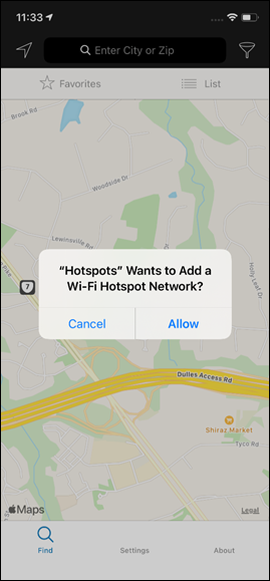
When the method to install the WiFi Profile is invoked, the Operative System prompts an alert to the user to ask for permission/confirmation (see user experience).
Cloud4Wi SDK provides two types of authentication methods:
WPA2 Enterprise
Passpoint
Read the Overview to learn more about the differences between WPA2 Enterprise and Passpoint.
The Cloud4Wi Location SDK (referenced as GeoUniq) abstracts away cross-platform differences between location services, allowing you to add geofencing and location tracking to your apps with just a few lines of code.
Note that you can use our toolkit apps for iOS and Android to test Cloud4Wi before integrating the SDK, or to test your implementation of Cloud4Wi side-by-side with a complete implementation.
In order to use the geofencing features unlocked by the Location SDK, you need to install also the WiFi SDK to initialize users in your Cloud4Wi account. Read more here.
Quickstart
Want to get started quickly? Follow these four steps:
Setup a project. Create and apps in your console and get your mobile key
Integrate the Cloud4Wi SDK into your app. Integrate the . Or, before integrating, test geofencing with our for iOS and Android.
Configure geofencing. Create custom geofences
Projects and Client Apps
Access the Apps Console by clicking Apps in the dashboard drawer menu.
Once you land on the Apps console, go to the list of projects and find the pre-existing Project usually named as "Default-<name of your account>". Please, do not create a new project; the ability to create multiple projects will be released soon.
For tihs Project, you can add multiple
A Project can be configured with any combination of Client Apps regardless of the mobile platform of each of them.
Device registration, Device IDs, and Device Base
When the Location SDK is integrated into a mobile app that has been configured as a Client App of a Project, every device on which the mobile app gets installed will be automatically registered by the Location SDK on Cloud4Wi.
Each device obtains a Device ID, generated automatically by Cloud4Wi, that can then be obtained by the mobile app.
The set of devices registered for all the Client Apps of a Project represents a unique Device Base for the Project, regardless of the Client App they belong to.
Location SDK performances
The Location SDK is lightweight and minimizes the impact on the mobile OS performance, both in terms of battery consumption as well as access to location data services.
Metric
Android
iOS
Frameworks
User experience
The SDK doesn't impose any requirement on the experience to enroll users into the WiFi service. The two main functions (initializing a user and installing the WiFi profile) can be deployed contextually or at different moments.
The WiFi user can be initialized at any time, even in the background, for example:
when a user signs up the first time for the app
the first time the app is opened after installing the app update that includes the SDK
at the moment the user explicitly makes some action for enabling the WiFi service
Once the WiFi user is initialized, the installation of the WiFi profile can be triggered by any user experiences, for example:
sending a push notification to the user informing them about the new WiFi service
with a banner in the home of the app
with a link in a menu
Regardless of the user experience that triggers the WiFi profile installation, Cloud4Wi advises creating and showing a dedicated informative screen that explains to the user the benefits of the service before calling the method to install the WiFi profile. In fact, installing the WiFi profile will open a dialog of the OS (different by OS and version) that might be confusing for the user if not previously informed.
First-time mobile app users
For users who just downloaded the app and opened it for the first time, you can integrate the WiFi enrollment as part of your app onboarding or sign-up experience, if any.
As soon as the user sign-up/sign-in to your app, you can present the user a screen that invites him to enroll in the WiFi service. At that point, you can initialize the user in Cloud4Wi using the proper method and then invoke the method to install the WiFi profile.
Here is an example of onboarding experience in the Cloud4Wi demo application
Existing uses
For existing users with the app already installed, you should create an onboarding experience triggered by a call to action. For example, you can:
send a push notification to the user informing them about the new WiFi service
show a menu or a banner in the app
Below is an example of a user experience that includes a menu icon to prompt the user to enroll in the WiFi service, which then presents the user with an informative screen before installing the WiFi profile on the device.
Note that the WiFi activation process is required only once, so it is not advised to create static banners or menus that remain visible also after the WiFi service activation.
The WiFi SDK provides a method (getCreatedWPA2EnterpriseProfiles or getPasspointProfiles) to verify if the WiFi Profile is currently installed or not. If the WiFi Profile is already installed, for example, you can hide the banner/link/menu item.
Operative System Alerts
The native OS alert that appears to the user to confirm the WiFi profile installation depends on the OS (iOS or Android), OS version, and, in the case of Android, eventually also on the smartphone vendor.
iPhone
Android 10
When the Profile is installed by the SDK, Android 10 doesn't prompt any immediate action. When a supported network is in range, Android triggers a silent notification that suggests the user to connect to a WiFi network.
Because the notification may appear with some delay after the profile installation, we advise instructing the user with a dedicated screen explaining the steps required to finalize the enrollment.
Android 11
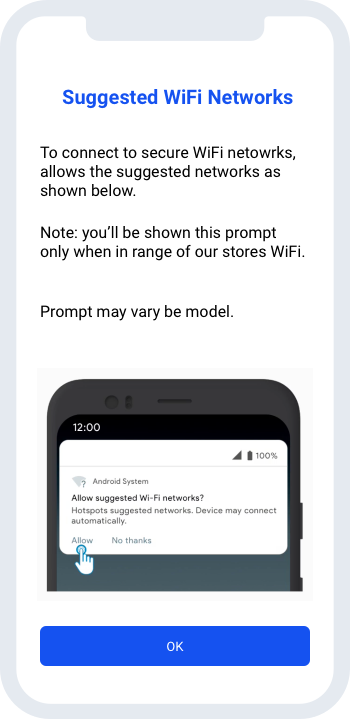
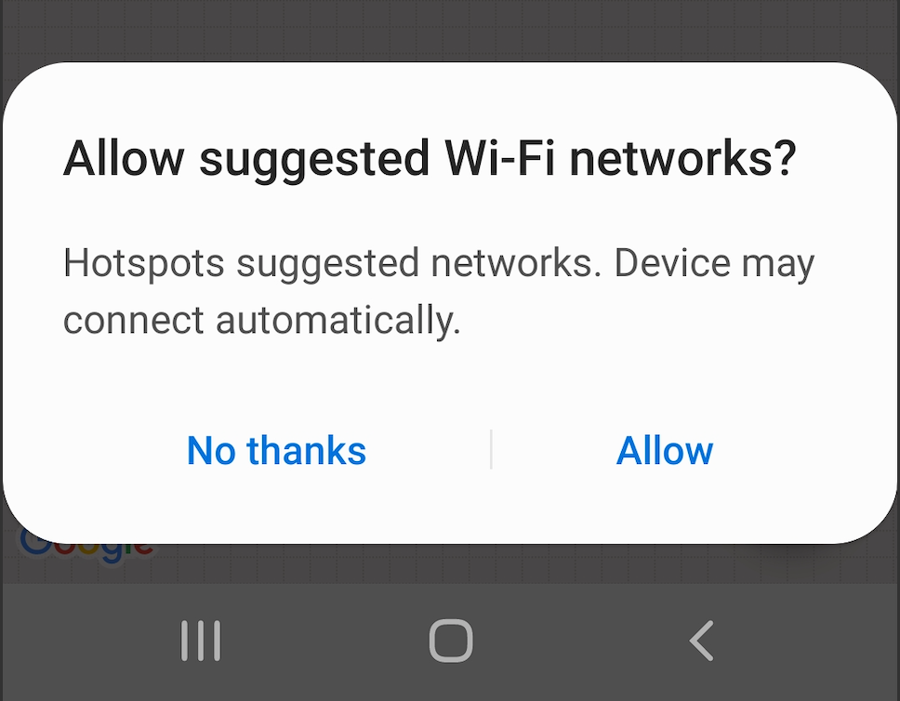
In Android 11, as soon as the profile is installed, the device prompts an overlay on the current screen that immediately asks the user to accept to connect to suggested networks.
Prompts may vary by smartphone model.
What the users see once connected
When connecting to a WiFi network thanks to a Passpoint profile provisioned via mobile SDK, the user will see the device associated with the WiFi, but Android and iOS show this in a different way
On iOS, the user will see the name of the SSID followed by a second line reporting "Hidden Network".
On Android, the user will see the Friendly Operator Name instead of the SSID, followed by a second line reporting "Connected via <name of the mobile App>"
What the userss see once connected
Once the device connects automatically to the network thanks to a Passpoitn profile installed via the SDK, the user will see their device connected to the network.
iOS will show the name of the WiFi network (SSID) with a second line reporting "Hidden Network"
On Android devices, users will see the Friendly Operator Name instead of the SSID name, and a second line reporting "Connected via <name of the mobile app>"
Initialize the SDK and updates certain Customer attributes at every login
Initializes the customer object in the Cloud4Wi account
Triggers the installation of a WPA2-Enterprise Wi-Fi profile in the device
QuickStart
Sample app boilerplate
The following app demonstrates an example of using the WiFi SDK (and the Location SDK).
The app is ready to run but you have to set your own credentials by putting them into plist file.
To test the WiFi section, based on Passpoint, you have to use a physical iOS device and have an access point configured in a Cloud4Wi account.
Add pod 'c4w-wifi-sdk' to your Podfile and run pod install.
Swift Package Manager
Configuration
In order to connect SDK to your Cloud4Wi account, you have to specify 'clientKey' and 'clientSecret'.
You can set them in your App Info.plist file by adding two following keys:
Required Capabilities
In order to use the SDK you have to add the 'Hotspot Configuration' capability to your application
Usage example
This example represents the following use-case:
Read the list of organization policies (the term "policies" is used to refer to consents and agreements that are configured on the Cloud4Wi account)
Creating new customer
Verifying customer credentials in API by retrieving customer info (optional)
Keep the customer update
To track the last seen date of the customer and to keep always updated the remote push notification token (if applicable) it is necessary to call the method every time the app starts
you can put it into didFinishLaunchingWithOptions for example
QuickStart
Integration
To integrate SDK library into your Android project you need to add Cloud4Wi repository. After that add the following dependency to your project's build.gradle along with 3 dependencies required by Cloud4Wi SDK as described below:
In order to connect your application with your Cloud4Wi account, you need to provide SDK with clientKey and clientSecret credentials.
Credentials may be provided to SDK either via configuration property or at runtime. Add two records into your application's string.xml as in examples below:
Add the following in 'application' section of your AndroidManifest.xml file:
Required permissions
AndroidManifest of this library requires following permissions
Usage Example
In following code example we will create new customer in the API and then install WPA2-Enterprise Wi-Fi profile on Android phone. After that when customer will be in range of Wi-Fi network with specified SSID - his device will connect automatically.
This example represents following use-case.
MobileSDK configuration. Setting API client credentials.
Read list of organization policies from API.
Creating new customer in API.
Keep the customer update
To track the last seen date of the customer and to keep always updated the remote push notification token (if applicable) it is necessary to call the method every time the app starts
QuickStart
Introduction
The plugin was developed with Flutter version 3.24.5, it contains a sample app that installs a WPA2 certificate. To perform a test it is necessary to enter correct keys. The integration and configuration include a first phase on the Flutter project and a second phase in the individual iOS and Android projects
Flutter installation
Run this command:
With Flutter:
This will add a line like this to your package's pubspec.yaml (and run an implicit flutter pub get):
Alternatively, your editor might support flutter pub get. Check the docs for your editor to learn more.
Import it
Now in your Dart code, you can use:
Android installation
Integration
To integrate SDK library into your Android project you need to add Cloud4Wi repository inside build.gradle
Add the following in 'application' section of your AndroidManifest.xml file:
Configuration
In order to connect your application with your Cloud4Wi account, you need to provide SDK with clientKey and clientSecret credentials.
Credentials may be provided to SDK either via configuration property or at runtime. Add two records into your application's string.xml as in examples below:
Required permissions
AndroidManifest of this library requires following permissions
Keep the customer update - Init method
To track the last seen date of the customer and to keep always updated the remote push notification token (if applicable) it is necessary to call the method every time the app starts
iOS installation
Required Capabilities
In order to use the SDK you have to add the 'Hotspot Configuration' capability to your application
Configuration
In order to connect SDK to your Cloud4Wi account, you have to specify 'clientKey' and 'clientSecret'.
You can set them in your App Info.plist file by adding two following keys:
Keep the customer update - Init method
To track the last seen date of the customer and to keep always updated the remote push notification token (if applicable) it is necessary to call the method every time the app starts
you can put it into didFinishLaunchingWithOptions for example
Usage Example
In following code example we will create new customer in the API and then install WPA2-Enterprise Wi-Fi profile . After that when customer will be in range of Wi-Fi network with specified SSID - his device will connect automatically.
This example represents following use-case.
MobileSDK configuration. Setting API client credentials.
Read list of organization policies from API.
Creating new customer in API.
Verifying customer credentials in API.
Project initialization
Project settings
Mobile key
Add the following key to Info.plist file (String value) with the corresponding value (that you obtained when added your app to your project)
Creation of WPA2-Enterprise Wi-Fi profile on Android device for test user to connect to test SSID.
Creation of WPA2-Enterprise Wi-Fi profile on device for test user to connect to test SSID.
Location usage keys
Add the following keys to Info.plist file (String value), the corresponding values will be shown to the user by iOS
If your app supports iOS add
Add the following key to Info.plist file (String value), it will be used to show a popup to the user before the provided by iOS. Only if the user accepted this first popup we request the permission to iOS.
Background fetch
In order to obtain a greater number of positions we suggest to enable this feature. To do this carry out these two steps:
Select your project -> Select your target -> Select 'Signing & Capabilities' tab -> tap on '+ Capability' -> select 'Background Modes' -> check 'Background fetch'
In AppDelegate add this code:
App Tracking Transparency
iOS 14 introduced the permission request to get the device's IDFA. In this regard, we have introduced two methods in our framework.
The first one checking the permission status:
And the second one that makes the request and returns the user's choice:
It is possible to use these methods but also the methods provided directly by iOS. There is no need to communicate to our framework the outcome of the permission. Invoke the request method as soon as possible. For example right after the enable.
Important: Before invoking the method for the request (both Geouniq and iOS) it is necessary to insert the key in the plist
Initialize Users
In order to track geofencing events, you need to initialize a user in your Cloud4Wi account.
The method to initialize users is exposed in the WiFi SDK, so you need to integrate also the WiFi SDK into your project.
Once both the WiFi and Location SDKs are installed you can use the following snippet to initialize the customer in Cloud4Wi as soon the deviceId is assigned to the phone. This function will initialize an anonymous user without any additional attribute or personal data associated.
In the alternative, you can use the native WiFi SDK methods to initialize a customer.
Cloud4WiSDKWiFi mobileSDK = new Cloud4WiSDKWiFi(getApplicationContext());

        try {
            mobileSDK.setAPIAuthParams("{client-key-value}", "{client-secret-value}");
        } catch (Exception e) {
            Log.e(TAG, "Cannot set API credentials: ", e);
        }

        mobileSDK.updateCustomerInfo(result -> {}, e -> {});
        /*
         * To register new customer we need to obtain required polices from API Server
         */
        mobileSDK.getListOfPolicies(
                policies -> {
                    Log.i(TAG, "Got policies. Num = " + policies.size());
                    logInfo("Got " + policies.size() + " policies: ");
                    for (String p : policies) {
                        logOutput("  " + p);
                    }

                    Customer customer = new Customer();
                    customer.setFirstName("Test");
                    customer.setLastName("Customer");
                    customer.setEmail(customer.getUsername());

                    /*
                     * In order to register new customer all polices requested by API Server should be accepted
                     */
                    for (String policy : policies) {
                        customer.addPolicy(policy, true);
                    }

                    /*
                     * Call Server API to create new customer
                     */
                    mobileSDK.createCustomer(customer, null,
                            customerCreateResponse -> {
                                Log.i(TAG, "Customer successfully created.");
                                logInfo("Customer successfully created.");

                                /*
                                 * Assure new customer has been successfully created via Server API by checking newly created customer's credentials
                                 * This step is OPTIONAL
                                 */
                                    mobileSDK.getCustomerInfo(customerCreateResponse.getUsername(), customerCreateResponse.getPassword(),
                                            customerInfo -> {
                                                Log.i(TAG, "Credentials approved.");
                                                logInfo("Credentials approved.");

                                                /*
                                                 * Here we are calling Android API to create WPA2-Enterprise Wi-Fi Profile for recently created new customer
                                                 */
                                                mobileSDK.createWPA2EnterpriseProfile(customerCreateResponse.getUsername(), customerCreateResponse.getPassword(),
                                                        wpa2EnterpriseProfile -> {
                                                            Log.i(TAG, "Wi-Fi profile successfully created.");
                                                            logInfo("Wi-Fi profile successfully created.");
                                                        },
                                                        e -> {
                                                            Log.e(TAG, "Failed to create Wi-Fi profile: ", e);
                                                            logError("Failed to create Wi-Fi profile: " + e.getMessage());
                                                        });
                                            },
                                            e -> {
                                                Log.e(TAG, "Cannot approve credentials: ", e);
                                                logError("Cannot approve credentials - " + e.getMessage());
                                            }
                                    );
                            },
                            e -> {
                                Log.e(TAG, "Cannot create customer: ", e);
                                logError("Cannot create customer - " + e.getMessage());
                            }
                    );
                },
                e -> {
                    Log.e(TAG, "Cannot get policies: " +  e.getMessage());
                    logError("Cannot get policies - " + e.getMessage());
                }
        );
<key>NSLocationAlwaysAndWhenInUseUsageDescription</key>
<string>We would like to access your locations</string>
<key>NSLocationWhenInUseUsageDescription</key>
<string>We would like to access your locations</string>
<key>NSLocationAlwaysUsageDescription</key>
<string>We would like to access your locations</string>
<key>GULocationPermissionNotDetermined</key>
<string>We would like to ask your permission to access your locations</string>
...
let permissionStatus = GeoUniq.sharedInstance().getATTrackingAuthorizationStatus()
...
...
GeoUniq.sharedInstance().requestATTrackingAuthorization { (status) in
    // Use status if you want
}
...
...
GeoUniq.sharedInstance().enable()
GeoUniq.sharedInstance().requestATTrackingAuthorization { (status) in
    // Use status if you want
}
...
<key>NSUserTrackingUsageDescription</key>
<string>The identifier will be used to personalise ads across apps and websites and to conduct marketing and research analysis</string>
let _ = GeoUniq.sharedInstance { deviceId in
            let cloud4WiSDKWiFi = Cloud4WiSDKWiFi.init()
            cloud4WiSDKWiFi.setupCustomer { customerResponse in
                if let customerResponse = customerResponse {
                    print(customerResponse)
                }
            } onError: { error in
                print(error!)
            }
        }
Overview
Cloud4Wi WiFi SDK empowers mobile apps with instant, automatic, and fully encrypted WiFi connection upon arrival to enabled locations, allowing app users to get a stable and fast connection for a smooth on-site experience.
Thanks to the secure WiFi authentication, the Cloud4Wi platform detects deterministically users’ arrival on site enabling apps with reliable location-awareness regardless of the OS location permissions.
Quickstart
Want to get started quickly? Follow these four steps:
. Create an App project in your Cloud4Wi dashboard and retrieve the client key and client secret on your dashboard. These are the credentials you need to authenticate the SDK and connect it to your Cloud4Wi account.
Set up WiFi network. Set up the in your Cloud4Wi account and with WPA2-Enterprise and/or Passpoint configuration.
WiFi connectivity
Cloud4Wi WiFi SDK empowers mobile apps with instant, automatic, and fully-encrypted WiFi connection upon arrival to enabled locations, empowering your app with a stable and fast connection to deliver a smooth on-site experience.
All your mobile users will be automatically connected and authenticated to the WiFi network as soon as they are in the range of the network.
Cloud4Wi SDK supports multiple WiFi authentication protocols to address different scenarios with the best solution: WPA2 Enterprise and Passpoint.
WPA2 Enterprise
WPA2 Enterprise is a standard protocol that allows devices to connect securely to a certain network identified by an SSID. These profiles are specific to the name of the SSID, which must be known before initializing and installing the profile. If the SSID on the network changes, the WiFi profile won't work anymore and a new profile needs to be installed.
This standard is supported by all mobile devices and WiFi hardware, making it a solid choice in case universal support is required - both on the end-user devices and network side. However, the dependency on the SSID name may pose some constraints in certain scenarios.
At this time, Cloud4Wi suggests using the WPA2-Enterprise technology for Android devices, whenever it is important to provide support to the majority of mobile devices, for example in regions with a high penetration of Android versus iOS.
You can choose any SSID name for your WiFi network. You need to communicate to Cloud4Wi the bundle id (for iOS) and the package name (for Android) of your apps and the SSID name you intend to use.
Passpoint
Passpoint is the next-generation hotspot technology based on the Hotspot 2.0 standard. the connection to a WiFi network using Passpoint does not depend on the name of the SSID. In fact, the same SSID can virtually broadcast multiple virtual operator networks. Passpoint also offers greater support for roaming across enterprise networks, as well as public and federated networks.
Passpoint is at the foundation of the OpenRaoming federation, which allows users to connect and authenticate to a vast number of networks managed by different service providers.
Passpoint profiles issued by Cloud4Wi are by default compatible with the OpenRoaming federation. Learn more about .
At this time, Cloud4Wi suggests using the Passpoint technology for iOS devices to provide a better onboarding experience to mobile users. In fact, when using the WPA2 Enterprise method, iOS attempts to connect immediately the user to the Wifi network, and if not in range it gives an error to the user in a dialog.
Location Moments
With Cloud4Wi WiFi SDK your app becomes aware when end users enter and visit any of your locations, and every on-site Moment becomes an opportunity to deliver powerful location-based experiences or drive monetization.
The automatic connection to WiFi allows Cloud4Wi to detect precisely all the customer visits and interactions and push the relevant Moments to your application systems via or . The WiFi SDK cannot provide client-side events to the app since the detection and processing of location moments are actually performed server-side.
Location Events are deterministic, overcoming the accuracy limitations of geofencing in indoor and high-dense urban environments.
No smartphone location permissions are required! User opt-in is collected with the consent experience you design in the app. The location is detected by the network, it doesn't require OS location services.
Privacy and Compliance
The WiFi SDK does not require Location permissions from the operative system to work. However, the SDK processes personal data for certain purposes so privacy regulations might require that you collect the proper consent from the customer.
You can design your own enrollment within your mobile app that includes the collection of consents.
For example, you can promote the new service to your mobile users (with a notification, banner, or button) and collect their acknowledgment and consent when they enroll.
For new users, you can rely on your existing Privacy Policy to collect the consent, and make sure it covers the personal data categories and purposes involved with this new service.
Network compatibility and requirements
You need to use a WiFi vendor and device models that are compatible with the service and certified by Cloud4Wi.
Certified tested vendors for the WPA2 Enterprise mode so far:
, Cisco Catalyst 9800
WPA2 Enterprise is a standard protocol, if the vendor is not listed among the tested ones, it is still very likely that is compatible with Cloud4Wi WiFi SDK. Please contact our team, we'll investigate the tech feasibility and develop the necessary integration if necessary.
Certified vendors for the Passpoint mode are:
You need to add a dedicated SSID on your WiFi network (different from the one used for standard guest WiFi), configured with WPA2-Enterprise settings and (optionally) Hotspot 2.0. The additional SSID will be used only by mobile app users and Passpoint-enabled users. At this time the SSID cannot be hidden.
Mobile devices compatibility
The SDK is currently available for iOS and Android, however, it can be easily integrated into any app developed with non-native dev languages such as Flutter or React Native (our team will provide guidance on the process). The SDK is compatible with an Android OS starting for version 4.3 and iOS devices starting from iOS 11.0
The WPA2 Enterprise mode is compatible with all Android and iOS devices mentioned above.
The Passpoint mode is compatible with all iOS devices and with a subset of Android devices:
starting from Android 12, Passpoint support is mandatory in all OEM vendors
almost all devices with Android 10 and 11 support Passpoint
for the oldest version of Android, the support of Passpoint is fragmented and depends on the device manufacturer. For example, Samsung phones support Passpoint starting from Android 8.
Integrate the Cloud4Wi SDK into your app.
Integrate the
. Or, before integrating, test WiFi connectivity with our
for iOS and Android.
Enable integrations. Create a or enable server-side to send Cloud4Wi events and user context to other systems. Or, you can create a triggered message in .